The StudyScout uses your own OpenRouter API key to power AI features. You only need to enter it once β it's saved privately on your device.
Go to openrouter.ai and sign up for free β takes less than 2 minutes!
Click Create to make a key
Copy the key (starts with sk-or-v1-...)
Paste it below and click Save & Start
β οΈ Please agree to the Terms of Service to continue.
β οΈ Never use The StudyScout on a public or shared computer β your API key is stored locally in your browser and could be accessed by others on the same device.
π The StudyScout does not store your API key on any server. It lives only in your browser's localStorage and is sent exclusively to OpenRouter's servers when you use AI features.
The StudyScout is an independent student project, not affiliated with OpenRouter or any AI provider. Use at your own risk. The developer is not responsible for any API costs incurred.
How to get your API key
1
Go to openrouter.ai and sign up
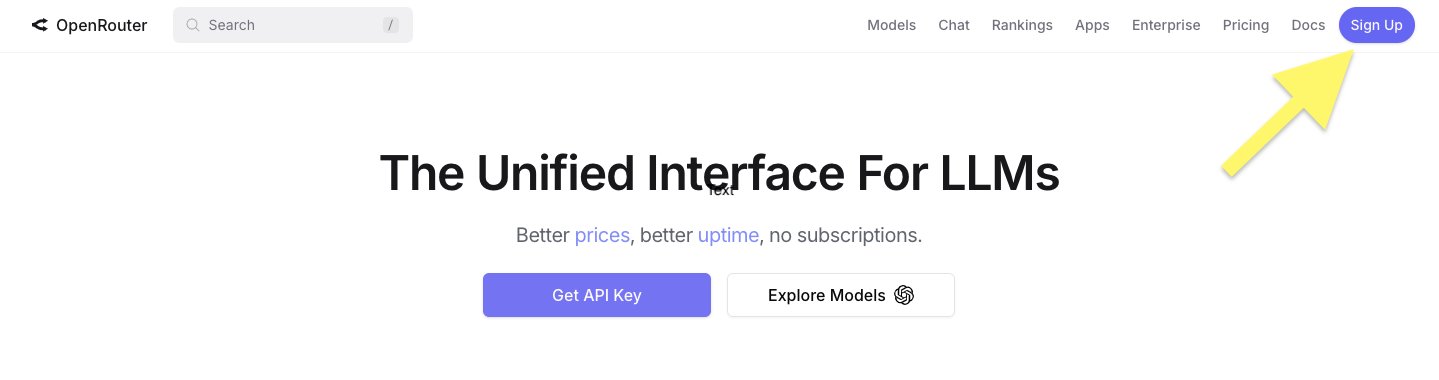
Go to openrouter.ai and click the purple Sign Up button in the top right corner.
2
Click "Keys" in the top menu
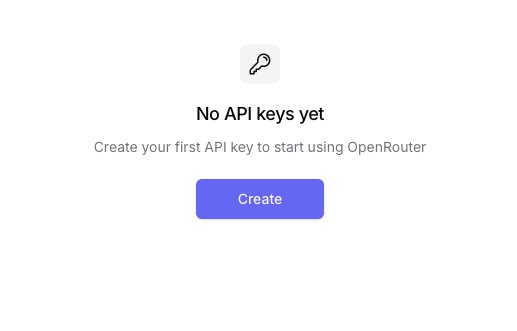
After signing in you'll see this screen. Click the purple Create button to make your first key.
3
Create a new key
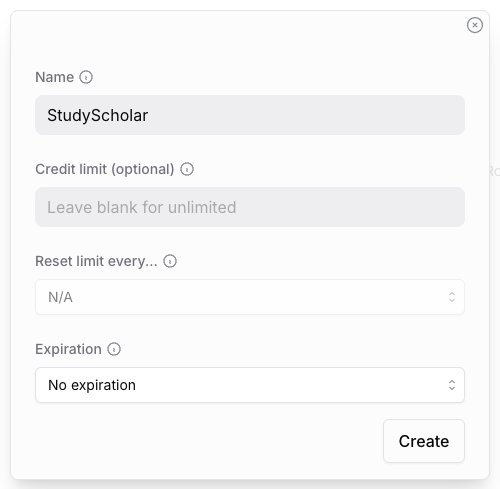
A dialog appears. Type The StudyScout in the Name field, leave everything else as is, and click Create.
4
Copy the key and paste it into The StudyScout
β οΈ OpenRouter only shows your key once. Click the copy icon next to the key immediately. If you miss it, just delete it and create a new one.
Go back to the The StudyScout welcome page, paste your key (starts with sk-or-v1-...), tick the checkbox, and hit Save & Start β. You're ready! π
The StudyScout is an independent student project, not affiliated with OpenRouter or any AI provider. Use at your own risk. The developer is not responsible for any API costs incurred.
Sage Β· AI Study Buddy
The StudyScout
AI Flashcards
π‘ Generate from a Topic
Just type a topic β AI creates a full deck from its own knowledge. No notes needed!
OR USE YOUR OWN NOTES / PDF
β¨ Generate from Notes or PDF
Paste your notes below, or upload a PDF β AI will scan it and create flashcards instantly.
π
Click to upload a PDF
or drag and drop
π
OR PASTE NOTES
Number of cards:
Preview
βοΈ Build Your Own Deck
Name your deck first, then add cards one by one.
β Add a Card
FRONT β Question / Term
πΌοΈ
Add image to front (optional)
Click to upload Β· JPG, PNG, GIF Β· Max 5MB
BACK β Answer / Definition
0 cards added
Choose a deck to study
0 / 0
Question
Loading...
π Tap to reveal answer
Answer
π‘ Need a hint or deeper explanation? Ask Sage using the owl button! π¦
Choose a deck to quiz
0 / 0
My Saved Decks
π Your Stats Dashboard
The StudyScout is an independent student project, not affiliated with OpenRouter or any AI provider. Use at your own risk. The developer is not responsible for any API costs incurred.